To remove a bad or negative review someone else left on your Google Business Profile, report it in Google's Reviews Management Tool under the policy it breaks, then appeal it with evidence if the report is rejected: that is the standard way to get it removed. You can't delete it yourself, and Google removes only reviews that break its content policies, never one you simply disagree with. Google decides.
Google blocked or removed over 292 million policy-violating reviews in 2025, while publishing more than 1 billion helpful reviews, according to its April 2026 Maps update. Our statistics report tracks how many reviews Google removes each year.
When Google will and will not remove a review
Google removes reviews for breaking its content policy, not for being negative. Find your review in one of the two columns before you report anything.
Google removes
Reviews that break a published policy
- Fake or deceptive reviews: spam, paid reviews, or an experience that never happened
- Conflict of interest: a competitor, an ex-employee or someone else with a stake, when the review itself shows it
- Off-topic content: a review of the wrong business, a political rant, ads or gibberish
- Harassment, hate speech, threats or personal attacks on named staff
- Profanity or sexually explicit language
- Personal information: phone numbers, addresses or a third party's details
- Blackmail: "pay me and I will take it down"
Google keeps
However unfair the review feels
- A real customer's honest negative review, even an unfair one
- An opinion you disagree with ("the food was bad")
- A low star rating with no text (rarely removed in the US)
- A review you believe is from a non-customer but can't show it: Google counts any contact
- Old reviews: they do not expire
Not sure which column yours is in? ReviewTactic checks every negative review on your profile against these policies, files the report and appeal for the ones that break a rule, and charges $99 only when a review comes down. Genuine reviews stay up, and no one can promise what Google decides.
Can you delete a Google review someone else left?
No: only the person who wrote a Google review can delete it, so a business owner's route is to report the review and ask Google to remove it.
Google's help page says you can't "directly delete someone else's review" and that you can "request that Google remove the review by reporting it" (Google Maps Help). No setting lets an owner erase a customer's review directly. Deleting or editing stays with the author, and you can ask them, as covered under Ask the reviewer below.
Which Google reviews can be removed?
Google removes a review only when it breaks one of its content policies, such as fake engagement, off-topic content, harassment or personal information, and it keeps honest negative reviews from real customers.
Those rules are the Maps User Generated Content Policy. A real customer's honest complaint will never come down, however many times you report it. A fake or abusive review often can. So before you report anything, find your review in this table. The middle column shows which of Google's reasons you'll pick on the report form.
| Review type | Removable? | Your path |
|---|---|---|
| Competitor, ex-employee, or someone else with a reason to hurt you | Yes: Fake or deceptive | Report → appeal quoting the admission |
| Fake review: it describes something your business doesn't have (a dish, a service, a staff member) | Yes: Fake or deceptive | Report → appeal quoting the review |
| You're sure the person was never a customer, but the review itself doesn't show it | Rarely: Google counts any contact, even a phone call | Report; appeal only with more evidence |
| Off-topic rant (wrong business, second-hand, political, unrelated), ads or gibberish | Yes: Low quality information | Report → appeal |
| Personal attack on named staff, or an unproven accusation of criminal conduct | Yes: Bullying or harassment | Report → appeal |
| Swearing or sexually explicit language | Yes: Profanity | Report → appeal |
| Hate speech or violent content | Yes: Discrimination or hate speech / Harmful | Report → appeal |
| Contains personal information (phone number, address, a third party's details) | Yes: Personal information | Report → appeal |
| Blackmail ("pay me and I'll take it down") | Yes: Fake or deceptive | Report → appeal with the messages attached |
| Low star rating with no text | Rarely in the US; often in the EU | US: report only. EU: legal complaint form |
| Real customer, bad experience | No | Reply + get more good reviews |
| An opinion you disagree with ("food was bad") | No | Reply + get more good reviews |
| Old negative review, no policy violation | No in the US; maybe in the EU if you can't identify the reviewer | Reply + get more good reviews |
| Coordinated review bombing | Partial: some may qualify | Report each one → appeal each one |
If your review sits in a Yes row, continue to the report flow below. If it sits in a No row, skip ahead to what to do instead, which is the fix you fully control. For fake reviews specifically, including ones a competitor left, our guide on how to remove fake Google reviews walks through each type with the evidence that works.
Reviews that name a competitor
A review that tells readers to "go to [Competitor] instead" is one of the stronger cases, because the evidence is in the review's own words. Pick Low quality information when the review is simply an ad for another business, or Fake or deceptive when you can show the reviewer works for or owns the competitor. These signs support the case:
- It names a specific business, not a generic category.
- It promotes the other business and describes nothing that happened at yours.
- The reviewer has ties to the competitor: 5-star reviews of it on their Google profile, or a link to it on LinkedIn, Facebook or the competitor's own website.
Screenshot the review and anything that links the reviewer to the competitor before you report it. The report has no place for evidence, so it goes into the appeal.
If a competitor posted fake reviews about visits that never happened, see how to report fake Google reviews from a rival.
Star-only reviews with no text
A star rating with no text is valid feedback under Google's policies, so the missing text is not a reason to report it. Through the report and appeal, star-only reviews rarely come down, because there are none of the reviewer's own words to quote. They have a chance when the account itself shows a pattern:
- A new account whose only review is yours, with no photo or other activity.
- One of several 1-star, no-text reviews that arrived within a short window from similar-looking accounts (see review bombing below).
- A reviewer whose other reviews are 5-star ratings for a direct competitor.
To check, click the reviewer's name, look at how many reviews they have and when they posted them, and screenshot what you find. Report under Fake or deceptive and attach the screenshots to the appeal. Keep the screenshots even if the review stays, because similar accounts posting later make the pattern stronger. In the EU, Google's legal form is the stronger route for these reviews (see if Google says no).
If you run a law firm, see review removal for law firms. Healthcare practices have extra privacy limits on what they can say in a reply; see HIPAA and patient reviews.
How do you report a Google review for removal?
You report a Google review in Google's Reviews Management Tool by picking one of seven fixed reasons, and because the report has no text box, the reason you pick is the whole report.
Business owners report reviews in Google's Reviews Management Tool: support.google.com/business/workflow/9945796. You need to be signed in to a Google account that is an Owner or Manager of the Business Profile. Use this tool rather than the Report button on Google Maps: it's the same tool you'll need later to check the status and file your appeal.
Step order checked against Google Business Profile Help on 18 October 2026. Button labels are as shown in our screenshots, added 30 September 2026.
Tap or click any screenshot to open it full size.
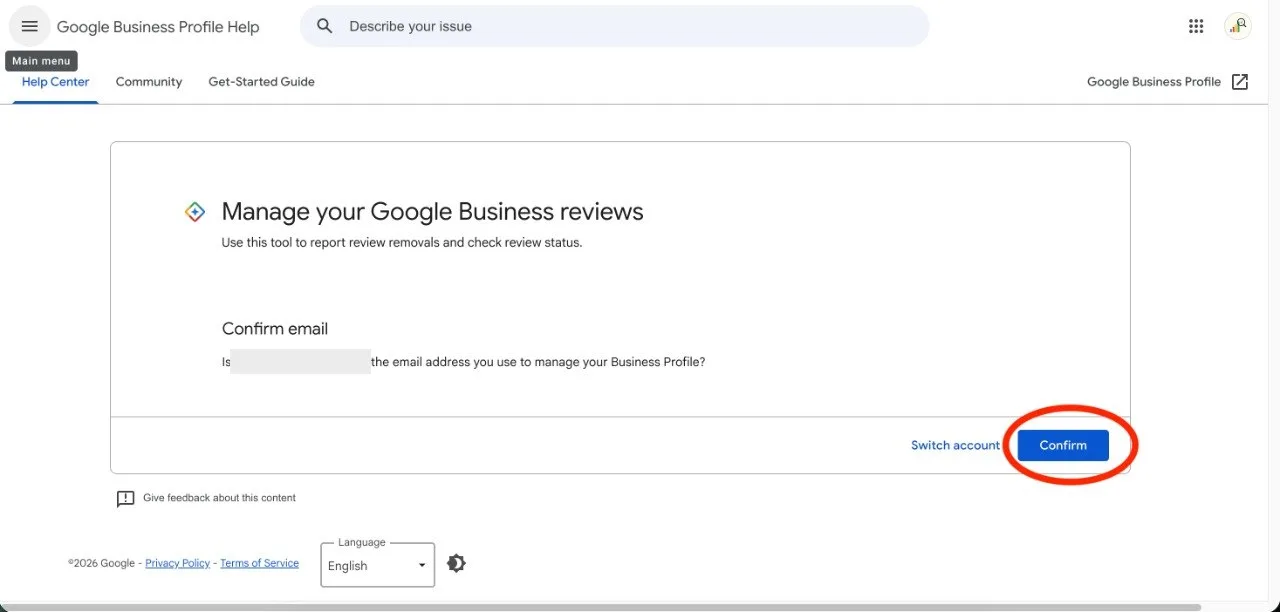
Step 1: Open the tool and confirm your email
Open the link above. Google shows the email address you're signed in with and asks whether it's the one you use to manage your Business Profile. If it is, click Confirm. If not, click Switch account and sign in with the right one.
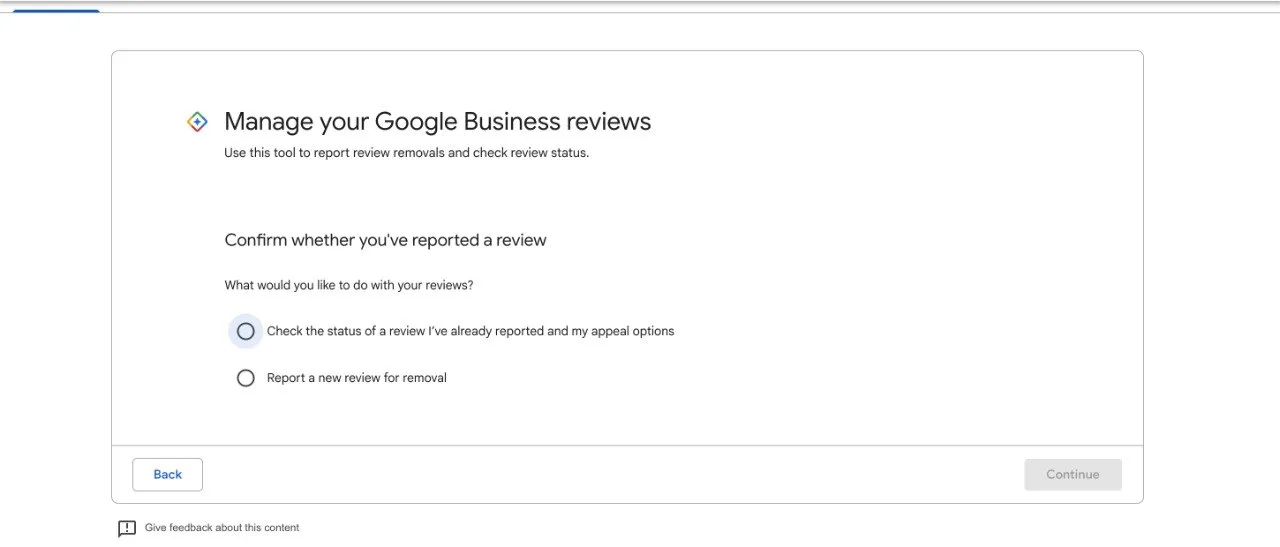
Step 2: Choose "Report a new review for removal"
The tool asks what you'd like to do. For a first report, choose Report a new review for removal and click Continue. Remember the other option, Check the status of a review I've already reported and my appeal options: that's where you'll come back to appeal.
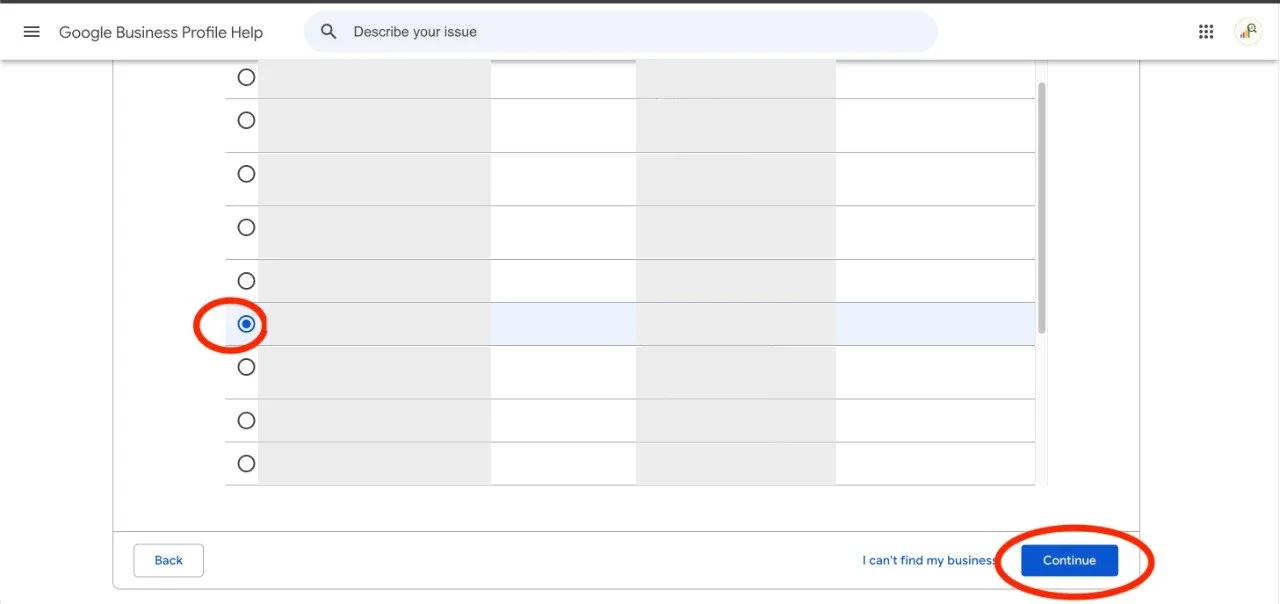
Step 3: Pick your business
Select the Business Profile the review is on and click Continue. If you manage several locations, check the address. If your business isn't listed, the account you confirmed in step 1 doesn't manage it.
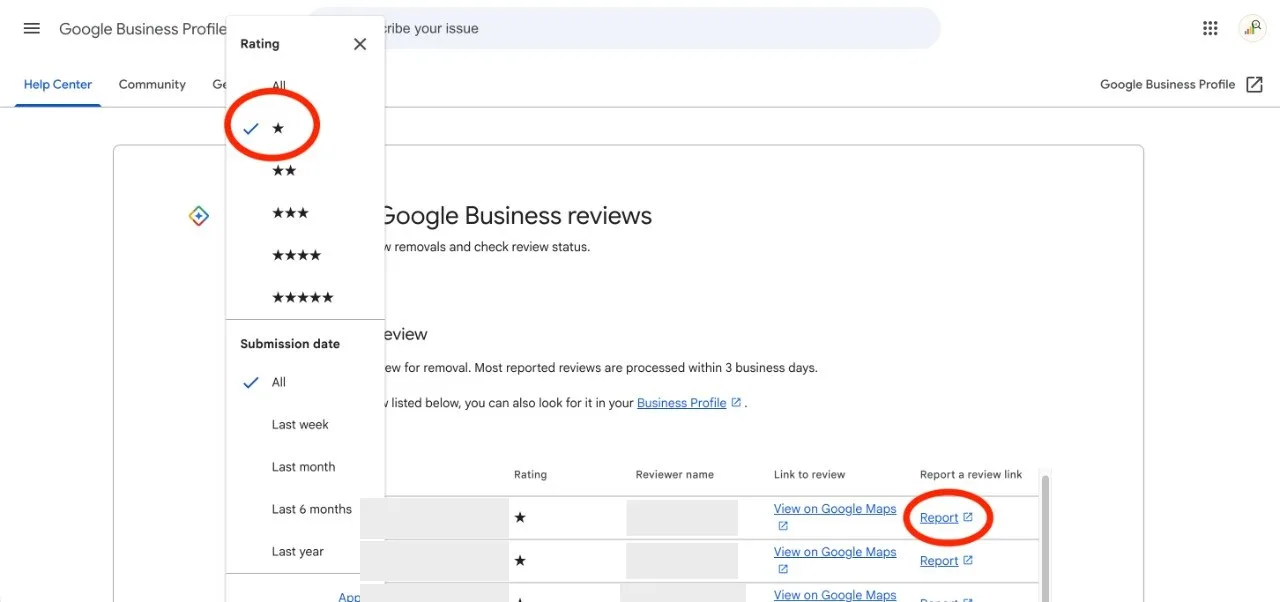
Step 4: Find the review and click Report
The tool lists your reviews with their rating, reviewer name and a View on Google Maps link. Use the filter to narrow it down (for example, one star only, or the last month), check you have the right review, then click Report next to it.
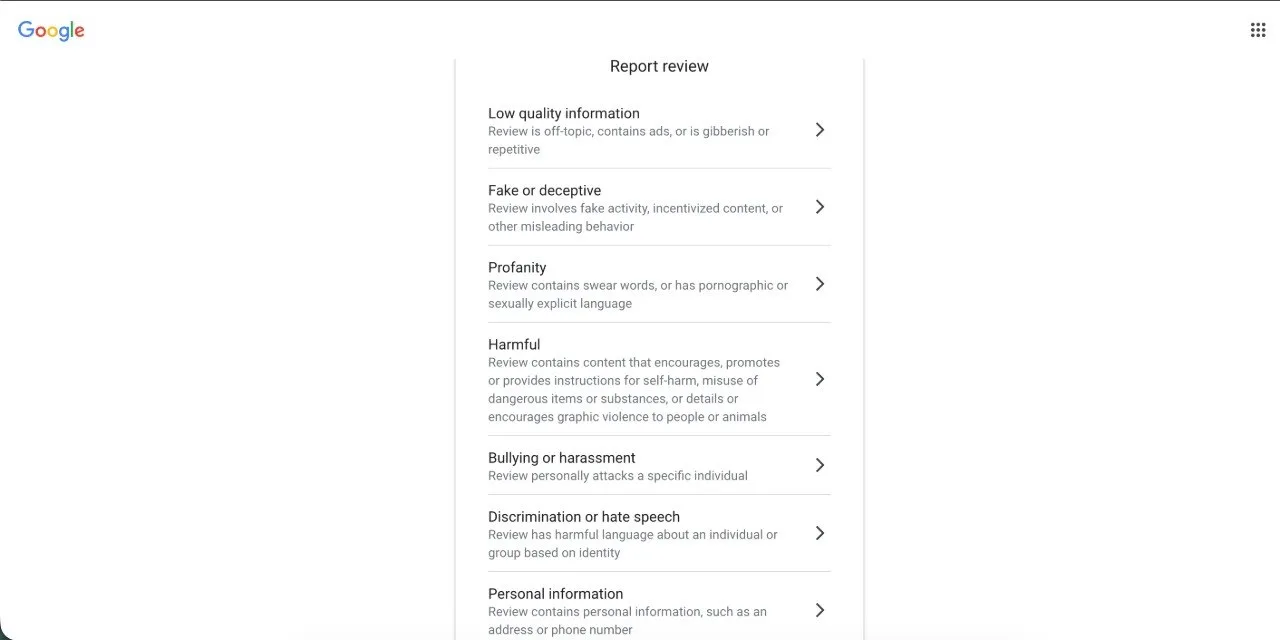
Step 5: Pick the reason
Google offers exactly seven reasons:
- Low quality information: off-topic, contains ads, gibberish or repetitive.
- Fake or deceptive: fake activity, incentivized content, or other misleading behavior. Conflicts of interest (competitors, ex-employees) and extortion go here.
- Profanity: swear words, pornographic or sexually explicit language.
- Harmful: encourages self-harm, misuse of dangerous items, or graphic violence.
- Bullying or harassment: personally attacks a specific individual.
- Discrimination or hate speech: harmful language about an individual or group based on identity.
- Personal information: an address, phone number or other personal details.
Pick the reason the review's own words prove, not the one that matches how you feel about it. An automated system checks the review against the reason you picked, so a reason the words don't support works against you.
Step 6: Submit
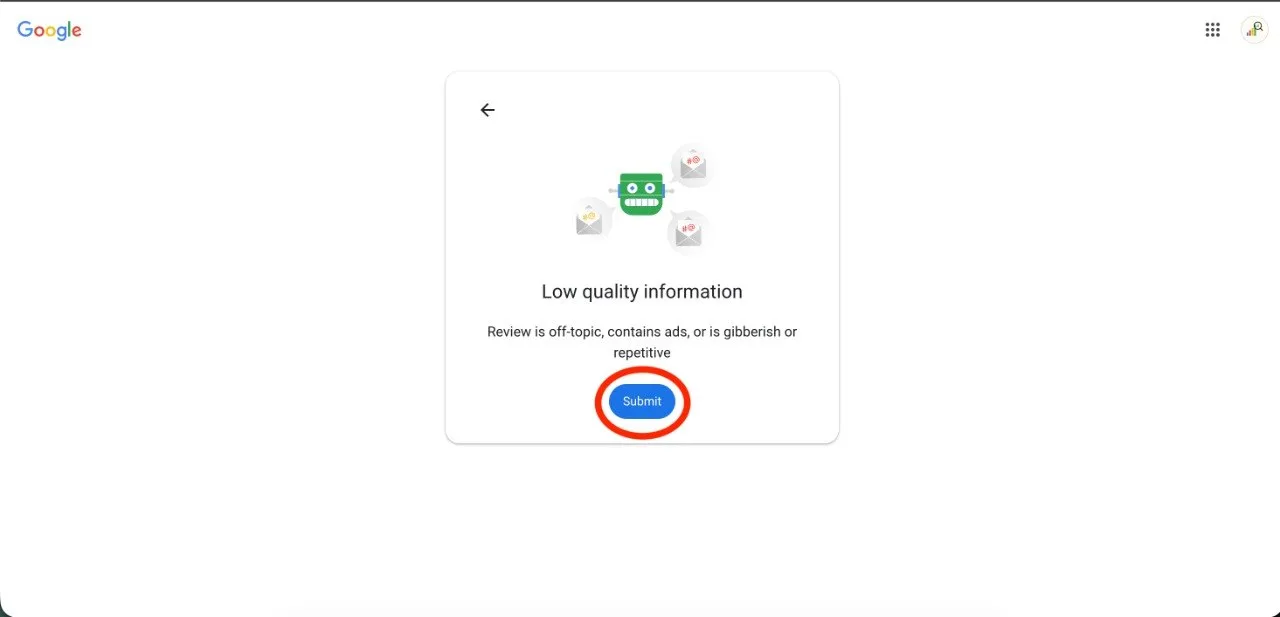
Google shows the reason you picked on a confirmation card. Click Submit. That's the whole report: there is no text box and nothing to attach at this stage, so your explanation and evidence go into the appeal. Screenshot the review before you report it, since it may be edited later.
Google says review evaluation typically takes several days. In our own filings, a report alone rarely removed a review, so treat the report as the formality: the appeal is the first place you can explain the violation and attach evidence.
How do you appeal to get a Google review removed?
If Google rejects the report, you can appeal that review once from the same Reviews Management Tool, and the appeal is where you explain the violation and attach evidence.
If the report is rejected, you can appeal. The appeal is the first time anyone reads your side, and you start it in the same tool as the report.
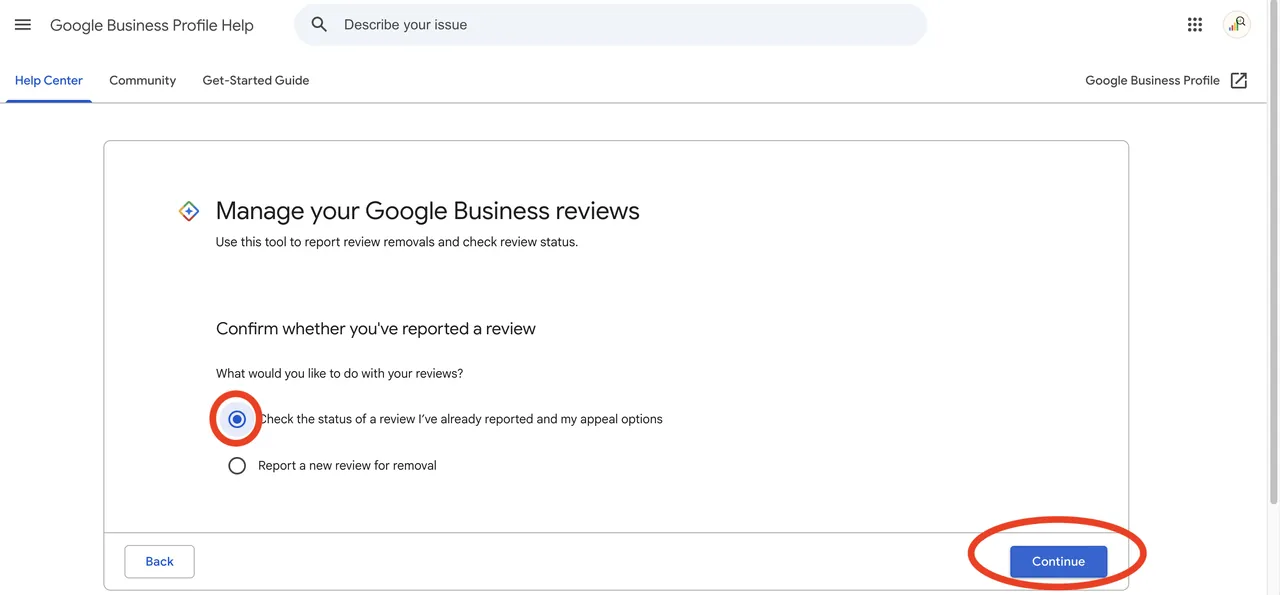
Step 7: Open your reported reviews
Open the Reviews Management Tool again and confirm your email. This time choose Check the status of a review I've already reported and my appeal options and click Continue, then pick the business if Google asks.
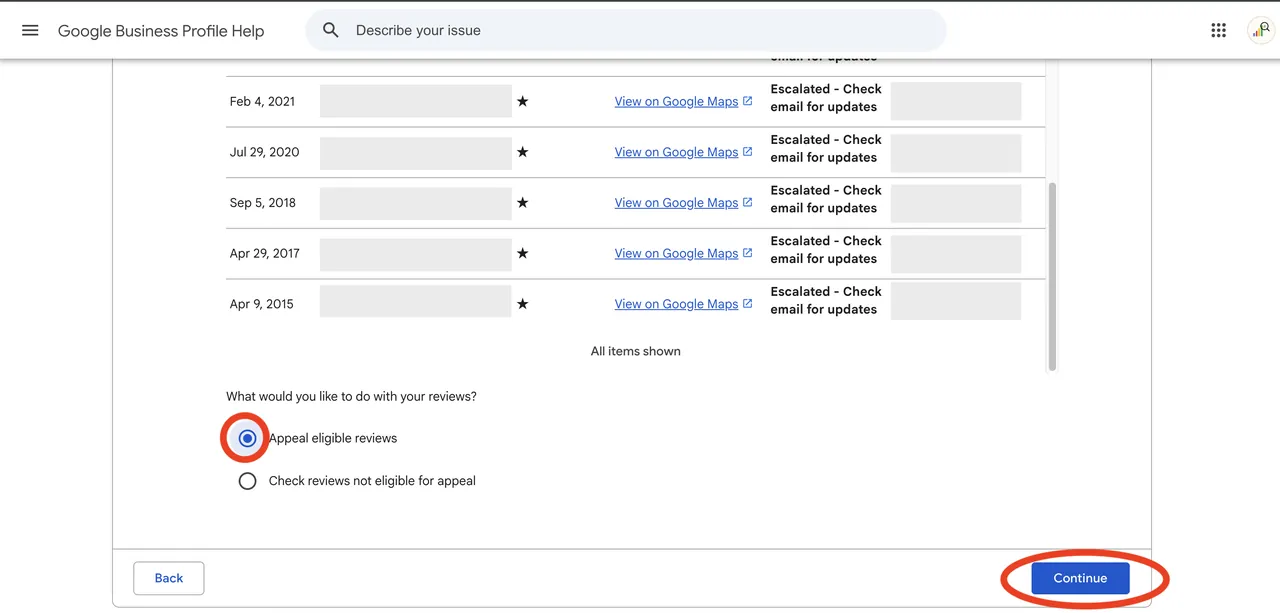
Step 8: Choose Appeal eligible reviews
Google lists every review you've reported with its current decision, such as Decision pending or Escalated - Check email for updates. Below the list, choose Appeal eligible reviews and click Continue.
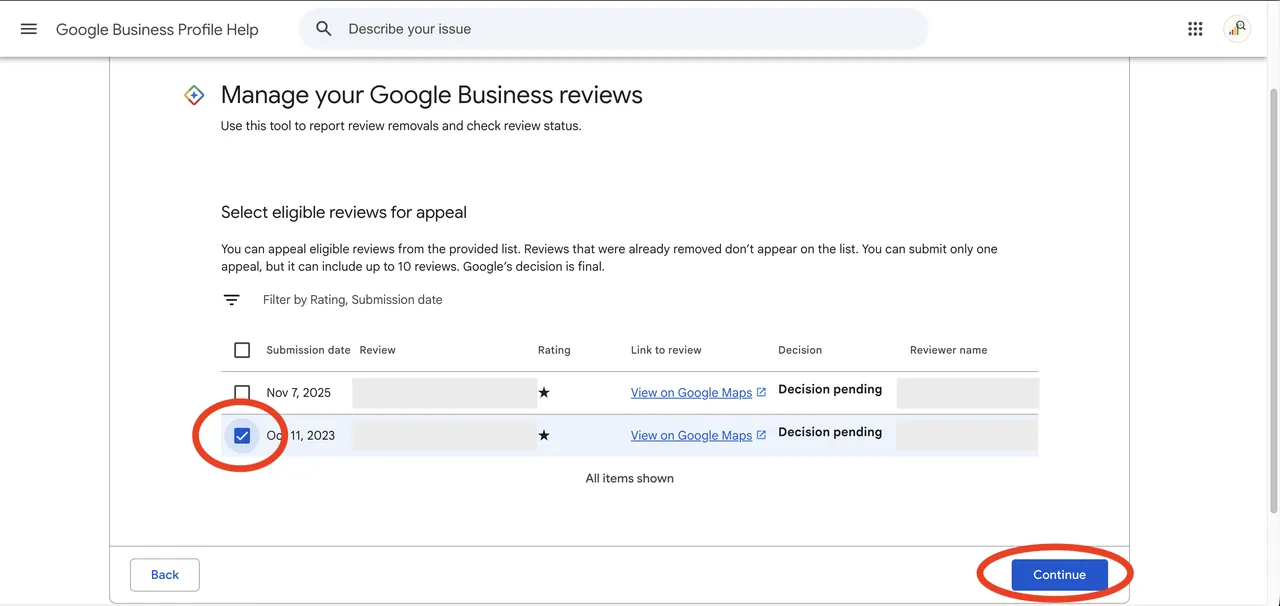
Step 9: Select the review to appeal
Select the review you want to appeal and click Continue. Reviews that were already removed don't appear here. Each rejected review can be appealed once, and Google's decision on it is final. If several reviews are fake, you appeal each rejected one separately.
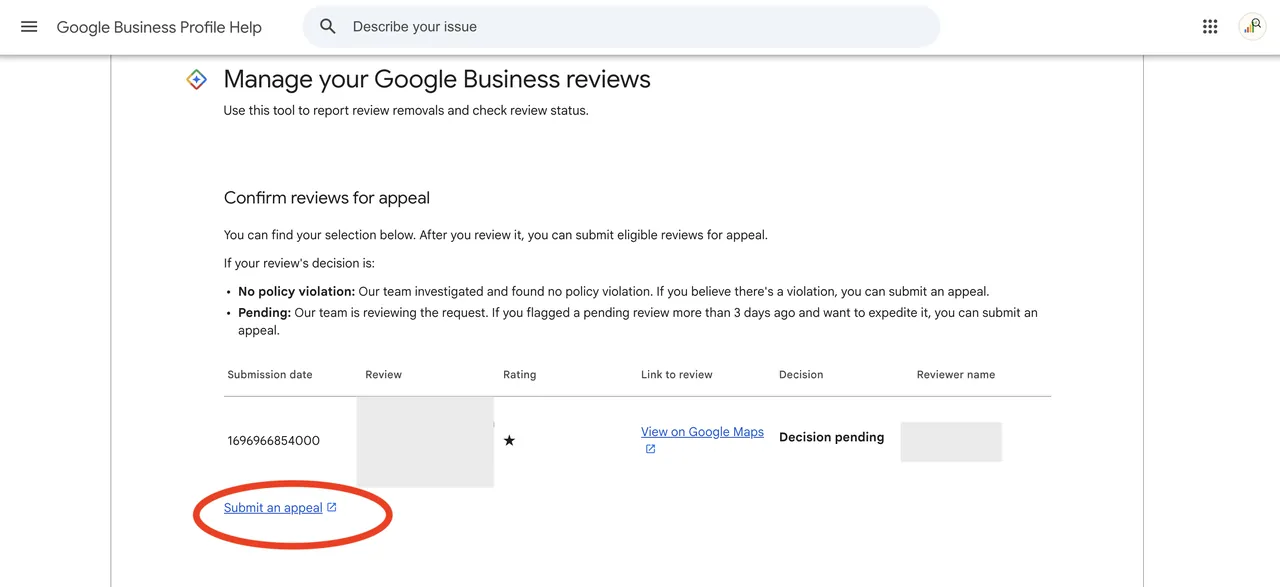
Step 10: Click Submit an appeal
Google shows your selection and the appeal rules. Click Submit an appeal. The appeal form opens in a new tab.
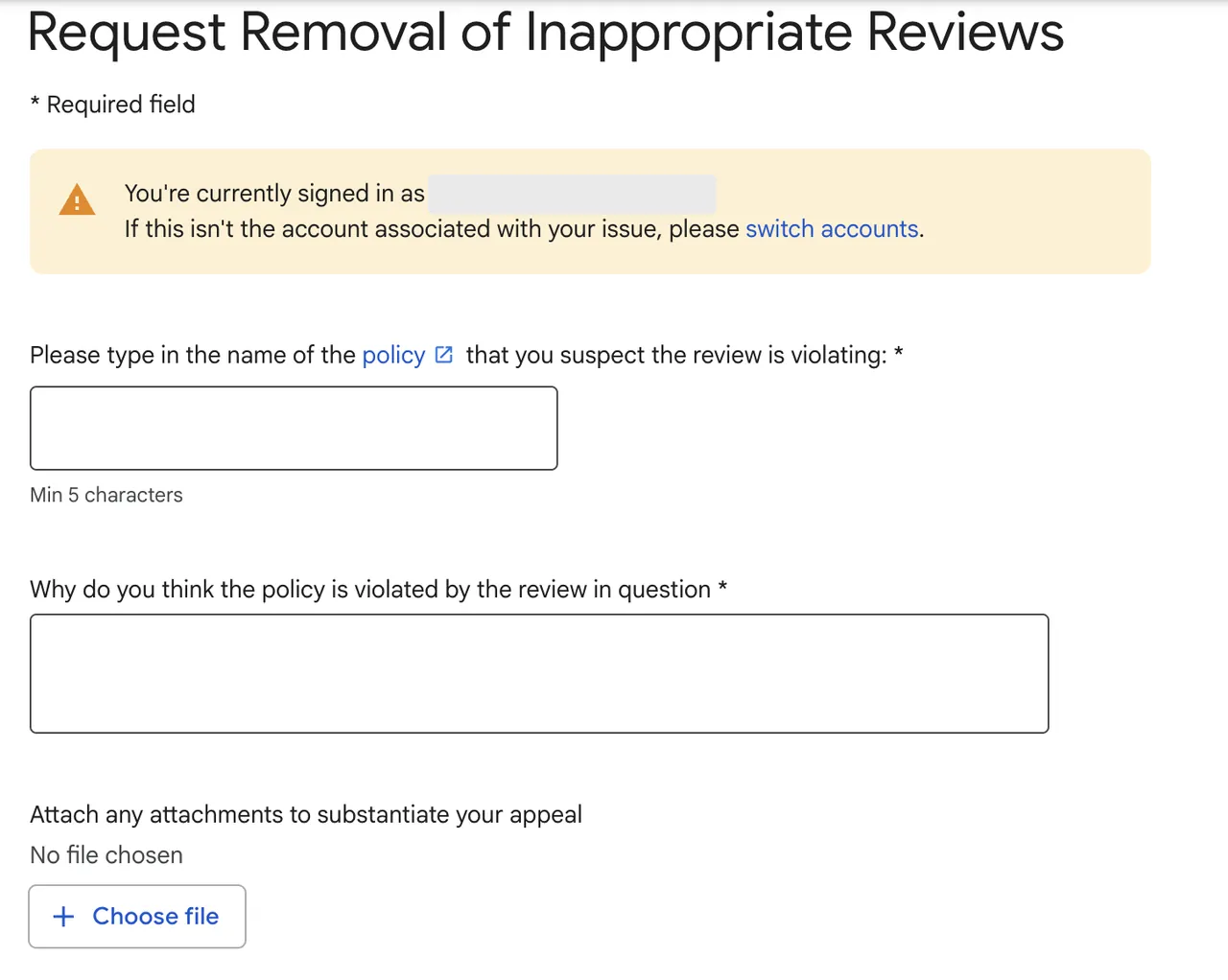
Step 11: Fill in the appeal form
The form, titled Request Removal of Inappropriate Reviews, is where the case is actually made. Check it shows the Google account that manages the profile, then fill in three fields:
- The name of the policy the review breaks, for example "Fake engagement" or "Harassment".
- Why the policy is violated: your explanation, written to the rules below.
- Attachments: the review screenshot and any real evidence you have.
How to write the explanation (three rules):
- Each rejected review can be appealed once. Google's decision on it is final and there's no second try inside the tool, so don't submit until it's right.
- The box holds 1,000 characters, roughly 150 words. Name the rule in the first sentence, quote the review's own words, say in one line why they break that rule, and ask for removal.
- A person reads it, and they only see what you send. Keep it plain. Attach the review screenshot and any real evidence (the reviewer's profile, messages, records). Never claim evidence you don't have.
An appeal that fits in the box:
This review breaks Google's Fake Engagement policy: it does not describe a genuine experience with our business. The reviewer writes "the chicken parmigiana was cold and the waiter ignored us for 40 minutes." We have never served chicken parmigiana, and we have no table service; customers order at the counter. Our current menu and a photo of the counter are attached. Please remove the review.
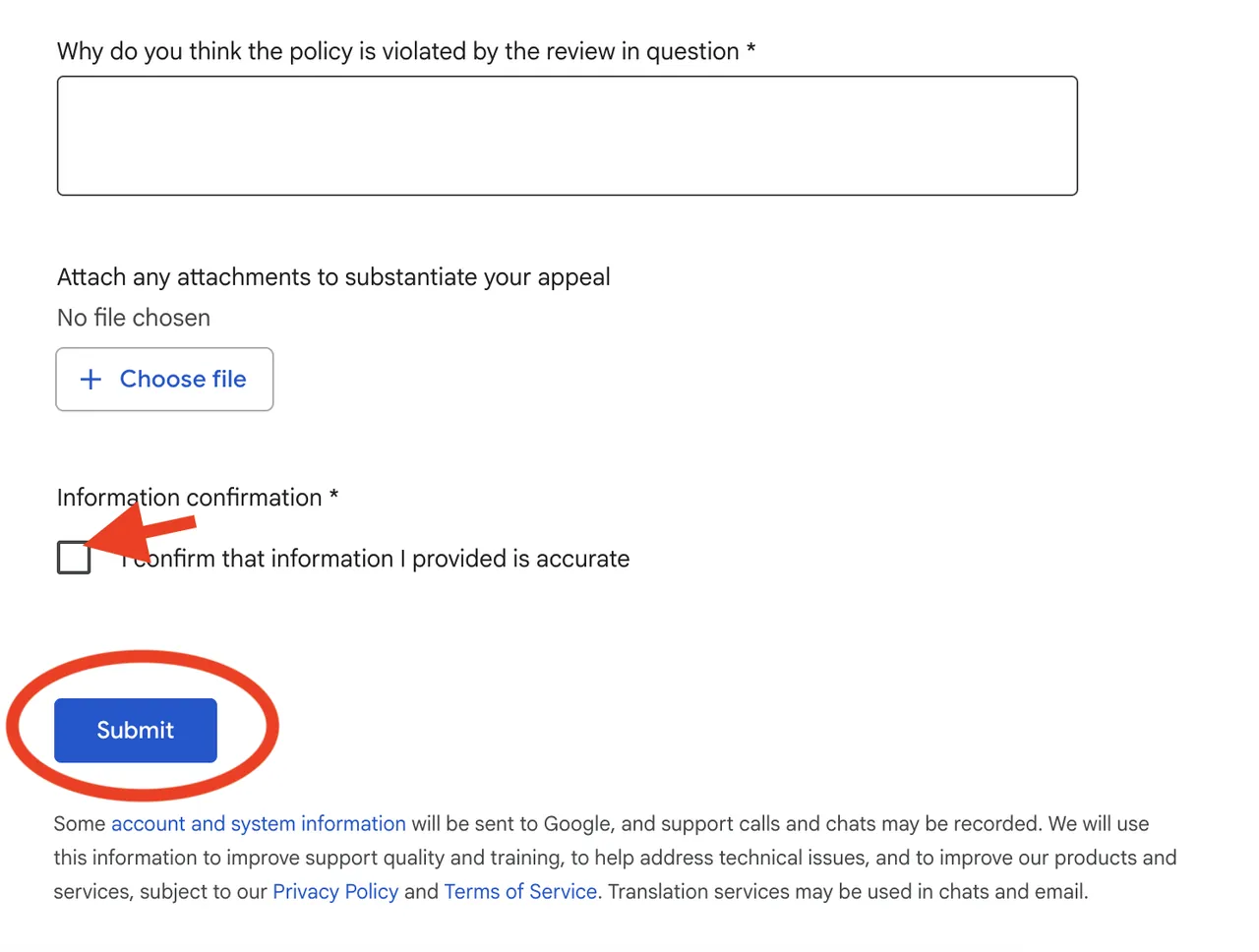
Step 12: Confirm and submit
Tick I confirm that information I provided is accurate and click Submit. Keep the Case ID from Google's confirmation. You'll need it if you ask on the forum later.
What happens next: Google replies by email and doesn't say why when it refuses. In our cases, removals after an appeal came through in 1 to 8 days. If you've heard nothing after about 10 days, treat the appeal as refused.
What can you do if Google refuses your appeal?
After a refused appeal there is no second appeal and no support line for review removals, so what's left is the Google Business Profile Community Forum, Google's legal form, and asking the reviewer.
Google's rejection email comes from a no-reply address and says you can't submit another removal request for that review. The "Remove reviews" option in Google's contact form just sends you back to the same tool. Three options are left. For the whole sequence on one page, from matching the review to a policy through to these last routes, see how to dispute a Google review.
The Google Business Profile Community Forum
The Google Business Profile Community Forum has Product Experts: experienced volunteers (not Google staff) who can pass a case that looks wrongly decided on to Google. Post the link to the review, your Case ID, a screenshot of the reviewer's profile, and a short, factual reason the refusal was wrong. Keep your customers' details out of it, and answer follow-up questions the same day, or the thread goes quiet.
Google's legal form
Where you are decides how far the law goes:
- EU: often the strongest route of all, and you don't need to report or appeal first. On Google's legal complaint form for Maps (reportcontent.google.com), you state truthfully that you can't find any customer relationship with the reviewer. Google then asks the reviewer to prove they had contact with your business. If they don't answer within about a week, Google can remove the review, including star-only reviews and ones under a made-up name. The reviewer has six months to object, and the review comes back if they prove the contact. Never claim you can't identify a reviewer you can.
- UK: a notice of complaint under section 5 of the Defamation Act 2013, sent through the legal form, gives Google 48 hours to contact the poster or remove the review.
- US, Canada and Australia: Google's legal form acts on court orders, not on letters. Defamation means a court case proving the review makes false statements of fact, not opinions. Australia also has a concerns-notice procedure under its defamation law. If the review is defamatory, see the legal options for removing a defamatory Google review.
This is not legal advice; talk to a lawyer before you use the legal form.
Ask the reviewer
Only the reviewer can delete or edit their own review. If the complaint names something you can still fix, fixing it and asking often works better than any Google channel. Never offer anything in exchange for a changed review: that is an incentivized review, and it breaks Google's policies on your side.
How long does it take to get a Google review removed?
Google says review evaluation typically takes several days, and in our own filings, removals after an appeal came through 1 to 8 days after it was filed.
| Stage | What to expect |
|---|---|
| Report | Google says review evaluation typically takes several days. In our filings, a report alone rarely removed a review. |
| Appeal | File it once the report is rejected. In our cases, removals came through 1 to 8 days after the appeal. No answer after about 10 days means refused. |
| Community Forum | Depends on the volunteers. Answer their questions the same day. |
| EU legal complaint | The reviewer gets about a week to prove the contact and can object for six months. |
| UK section 5 notice | Google has 48 hours to act. |
Removal isn't guaranteed, and the review stays visible while Google decides, so work on the part you control, below.
What doesn't work when you try to remove a Google review?
Five common moves don't get a Google review removed: relying on the report alone, emotional appeals, legal threats inside the appeal, paying for guaranteed removal, and doing nothing.
- Reporting and waiting. The report is checked by an automated system; in our filings, a report alone rarely removed a review. The appeal, with your explanation and evidence, is where the case is read, and each review gets one.
- Emotional appeals. "This review is destroying our business" doesn't help, and neither does "clearly violates". Google's reviewer needs the policy, the review's own words and your evidence, not feelings.
- Threatening legal action in the appeal. Mentioning lawyers in an appeal doesn't make it stronger. Save legal language for Google's legal form, where it belongs.
- Paying "guaranteed removal" services. Some charge hundreds of dollars or more upfront and use the same free tools you have. Some are outright scams. Reporting and appealing are free.
- Doing nothing. Reviews don't expire. They stay on your profile and in your rating until the author deletes them or Google removes them.
What can you do about a bad review that can't be removed?
Reply to it calmly in public and keep collecting new reviews from real customers, because an honest negative review stays up however often you report it.
Those reviews don't have to define your business. Three things work:
1. Respond publicly
A calm, professional reply to a bad review does something powerful: it tells every future customer reading your profile that you handle problems well. The reply is for them, not the angry reviewer. Keep it to 3-4 sentences: thank, apologize for the experience, address the issue briefly, and offer to resolve it offline. For templates and a full framework, see our guide on how to respond to bad Google reviews.
2. Outweigh it with new reviews
The more reviews you have, the less one bad review moves your average; the Google review calculator shows by how much for your numbers. Ask every happy customer, use a one-tap review link or QR code, and make the ask part of every visit.
3. Fix what the pattern shows
If several reviews name the same problem, read them as operational data, not an attack. Fix the cause, then say what changed in your next replies, so readers can see it was handled. One bad review is an opinion; the same complaint again and again is a process to fix.
How do you handle a review-bombing attack on Google?
Report each review in the attack, then appeal each rejected review separately, with the pattern described and the evidence attached.
If you've received a sudden flood of bad reviews, from competitors, angry internet communities, or extortion attempts, the situation is different from a single bad review. Some of these reviews may qualify for removal individually (fake engagement, conflict of interest), but the volume makes reporting them one by one slow.
For coordinated attacks:
- Document the pattern: screenshot timestamps, reviewer profiles, and any threatening messages. Attach them to your appeal.
- Report each review, then appeal each rejected one: describe the pattern in each appeal and attach the evidence.
- Report extortion: if someone is threatening bad reviews unless you pay them, report the reviews as Fake or deceptive and use Google's merchant extortion report form. Attach the threatening messages to your appeal. Never pay.
- Ask on the forum: if the appeal is refused, post the pattern on the Google Business Profile Community Forum with your Case ID.
For the full playbook, see our review bombing and extortion protection guide.
Should you hire a Google review removal service?
A Google review removal service files the same free report and appeal you can file yourself, so what you pay for is the case-building: the right reason, an appeal that fits in 1,000 characters, and the evidence that wins.
When a removal service makes sense:
- You have several reviews that break Google's rules and don't have time to report and appeal each one yourself.
- You haven't appealed yet and want the appeal for each review to be as strong as it can be.
- You're dealing with a review bombing attack and need bulk removal support.
When it doesn't:
- The bad reviews are from real customers. No service can remove legitimate complaints.
- The service charges upfront and keeps the money if the review stays up.
- The service promises "guaranteed removal". No one can guarantee what Google will do.
What eight removal services publish about price, payment terms and guarantees is compared in our guide to the best Google review removal services. ReviewTactic's own Google review removal service charges $99 per review Google removes and nothing if it stays up, and the first check is free. Why prices differ between services is in our Google review removal cost guide. Thinking of a freelancer instead? Our guide to hiring on Fiverr or Upwork to remove Google reviews covers what to ask first.